

Changelog
Release history and updates for Paperguide platform
MCP Server: add papers and PDFs from your assistant
Your AI assistant can now save papers to your Paperguide reference manager, not only read it.
- Add a paper by DOI. The details are looked up and the open-access PDF is fetched and attached in the background.
- Add a paper from a PDF link. The file is downloaded, the paper is identified from it, and the reference is created with the PDF attached. If it cannot be identified, your assistant asks you for the title.
- Attach a PDF to a paper you saved earlier.
- Duplicates are not added twice. All of this is free.
MCP Server: your reference manager in your AI assistant
Your AI assistant can now work with the papers you have saved in Paperguide, not only the public database.
- Find saved papers by title or DOI, browse your folders, and get details with a BibTeX entry. Free.
- Search inside your PDFs and get the relevant passages with page numbers. 10 credits.
- Read a paper in full to summarise or review it. 10 credits per part.
- Organise your library: create and rename folders, and move papers into them. Changes appear in Paperguide immediately. Free.
- Check your usage by asking your assistant. Free.
Dual Review for systematic reviews
Systematic reviews now offer a second review method. Until now every review was AI-led: Paperguide AI screened each paper and one verifier confirmed the decisions. Reviews that must meet Cochrane or PRISMA expectations need two independent human screeners, and that is what Dual Review adds.
- Two reviewers, one resolver. Each screening stage has a Reviewer 1, a Reviewer 2, and a Conflict Resolver. Both reviewers screen every paper independently. When they agree, the decision is final. When they disagree, the resolver decides.
- Blind review. Reviewers cannot see each other's decision on a paper until both have made one. On by default, and a Full Access member can turn it off.
- AI evidence without AI decisions. Paperguide AI can show its reasoning and cited text for every criterion to help reviewers find the relevant passage, but it never records an include or exclude. Turn it off per stage if you want a purely human screen.
- Papers move as soon as they are decided. Full text screening can start on a paper the moment its abstract decision is final, rather than waiting for the whole stage.
- Cohen's Kappa. The stage card shows the agreement score between your two reviewers, ready to report in your methods section.
- Comments and a full record. Members can discuss a paper in its comments, and every vote, change of vote, and resolver decision is kept in the paper's history.
Choose the review method when you create a review. It cannot be changed afterwards. Get started with Dual Review.
Activity log for systematic reviews
Every systematic review now has an Activity panel showing everything that happened across it: protocol changes, papers added or removed, screening and extraction runs, confirmations, report versions, and changes to members and roles, each with who did it and when. Filter by area to follow one part of the review.
Research Agent: Gap Analysis & PRISMA Diagrams
The Research Agent can now do two things it couldn't before — all grounded in the papers it searches and cites.
- Research gap analysis: Ask the agent to identify gaps in the literature, and it will analyze the available evidence, pinpoint what hasn't been studied yet, and surface underexplored areas worth pursuing. It reasons across the papers it has gathered, highlights patterns and contradictions, and ties every finding back to its source — so each gap is backed by the evidence that reveals it.
- PRISMA diagram generation: Ask the agent to generate a PRISMA flow diagram, and it will build one from the papers it has screened and included — showing identification, screening, eligibility, and inclusion counts — so you have a publication-ready diagram without assembling it by hand.
Extract Data improvements
Data extraction is more accurate and precise across the board. The quality of extracted values has gone up, so you can trust the output more without going back to check every cell against the source.
- Accurate sentence highlights from the PDF: Every extracted value now links to the exact sentence it was pulled from in the PDF, so you can verify a citation in one click instead of hunting for the passage yourself.
- Output type controls: You can now set the expected output type for each extraction field. Choose from Answer (free-text response), Yes / No / Maybe (forced decision), or a Specified format you define — so the AI returns exactly the shape of data you need rather than filling in whatever it thinks fits.
Sharing and collaboration in the AI Writer
Until now, a document in the AI Writer was yours alone. If a co-author or a supervisor needed to see a draft, you exported it, sent it somewhere else, and collected the feedback outside Paperguide, away from the sources and citations the draft was built on.
You can now write, cite, and review a draft with the people you're writing it with. A co-author can draft a section, a supervisor can comment on your argument, and the whole thing stays connected to the papers in your library, so the sources behind a claim are one click away for everyone reading it.
- Access levels: You can bring other people into a writer document and set what each of them can do. Can edit, for co-authors writing alongside you. Can comment, for a supervisor or reviewer who should mark up the draft without changing it. Can view, for anyone who just needs to read it.
- Comments: Anyone with comment or edit access can select a passage and leave a comment on it. The comment stays anchored to the text it's about, so a note on a claim sits with the claim rather than in a separate document of feedback someone has to reconcile later.
- Working on a shared draft: Everyone works from the same document rather than passing versions back and forth, so there's nothing to reconcile at the end.
- How to share: Use the Share button at the top of the document, enter an email, choose the access, and send. You don't need a team plan for this. Anyone on Paperguide can share and collaborate.
Citations now group together
When several citations sit next to each other, they combine into a single parenthesis, (Brown, 2009; Porter, 2004; Smith, 2015), rather than three in a row. The grouping follows the rules of whichever style you've selected. If you'd rather keep them separate, you can switch it back in settings.
The research agent runs inside the reference manager
There's an AI Chat button at the top that opens an agent chat on the papers already in your library, so you can ask questions, compare studies, and run tasks without moving out of it.
Larger PDF uploads
The upload limit is now 100MB for each PDF, up from 50MB, on paid plans.
Fixes
- Author names in citations: The writer was printing the author's first name in in-text citations. It now prints the last name, with initials formatted per the selected style.
- Editing after the report: In systematic review, editing the protocol once the report existed caused problems. You can now edit the protocol or go back to an earlier step after generating and regenerate the report cleanly.
- PDF indexing speed: Uploaded PDFs took a while to index before the agent could chat with them. That's faster now, though large files still take a moment.
- First page load: The opening page of a PDF was slow to render in the viewer, both for reference manager papers and full texts. Fixed.
- RIS and BIB imports: Both were failing in the reference manager. Fixed.
- Citations in agent chat: Fixed style and numbering issue in research agent chats.
Research agents got smarter
We moved to improved models, so responses are better, the agent understands what you are actually asking more reliably, and synthesis across papers is noticeably stronger. This applies to agent chats too, not just full agent runs.
Research agents now make figures
Ask for a chart or graph, and the agent will build it into the response, drawn from whatever it has pulled together. Worth trying on your next run to see what it does with your data.
The Norton issue is fixed
A number of you wrote in saying Paperguide was blocked on your systems by Norton security. It was a false detection on their end; Paperguide was flagged and restricted without cause. Norton has re-evaluated and cleared it, so access should be back to normal.
MCP Server Updates
- Look up papers by DOI or PubMed ID — Your AI assistant can now fetch a paper's details directly using its DOI or PubMed ID, without needing to search first. Useful when you already have a reference and want full details quickly.
- Cleaner paper details — Removed the one-line AI summary (tldr) from results since the abstract provides the same information with more detail. Publication dates now include full date precision (e.g. "2023-03-09") instead of just the year.
- Settings renamed — The settings section formerly called "Connected Apps" is now simply labeled "MCP" — find it at Settings → MCP to manage your connections and check usage.
Paperguide MCP Server
You can now search Paperguide's database of 200M+ academic papers directly inside your AI assistant. Connect Paperguide to Claude, ChatGPT, Cursor, VS Code, Windsurf, Codex, or any other client that supports MCP — no API keys, no config files, no manual setup.
What you can do
- Search papers: Ask your assistant a research question and it searches Paperguide for matching papers with key details.
- Get full details: When a paper looks relevant, your assistant fetches the full abstract, authors, journal info, DOI, and citation details — all without leaving the conversation.
How it works
Add https://mcp.paperguide.ai/mcp as a remote server in your assistant. Sign in with your Paperguide account and you're connected. MCP uses your existing AI credit balance — 10 credits per search, 2 per paper fetch. Failed calls are not charged.
If you belong to an organization, you can choose which credit account pays for MCP usage when you connect each app.
Systematic Review
You can now run a full systematic review inside Paperguide — from research question to a synthesized report with a PRISMA diagram — with AI doing the work at every stage and a person verifying each decision before the review moves forward.
What's included
- Protocol: Define eligibility criteria and extraction fields. AI generates a starting set from your research question, which you edit.
- Papers: Collect papers from AI Search queries or your reference manager into a single set, with duplicate detection.
- Title & Abstract Screening: AI screens every abstract against your criteria, gives a decision and exclusion reason, and cites the evidence.
- Full Text Screening: AI screens full-text PDFs with a per-criterion summary and evidence.
- Data Extraction: AI extracts your defined fields into a table, with citations back to the source statement.
- Report: AI synthesizes the extracted data into a report with full methodology and an auto-generated PRISMA diagram.
Why it matters
Every screening decision records both what AI proposed and what a human changed. Every extracted value links to the statement it came from. The PRISMA diagram updates automatically as decisions change. That audit trail is what makes the output defensible.
You can run a review solo or add a team with role-based verification — assign verifiers to stages so responsibilities are clear from the start.
Team workspaces are live
A workspace is a shared library your whole team works in. Everything created inside it is available to everyone in it. No forwarding PDFs, no exporting reference lists, no asking who has the latest version.
In a workspace, your team can:
- Build and annotate a shared reference library
- Write and collaborate on documents
- Extract data from papers together
- Run systematic reviews as a team
You can create separate workspaces for different projects, labs, or groups, and control who has access to each one. An admin dashboard shows usage and access in one place.
How workspaces work
Paperguide uses an organization and workspace hierarchy. Your organization is the top-level team container, and each workspace holds its own Reference Manager, AI Writer, Systematic Review, Extract Data, and Notebooks.
There are three workspace types:
- Personal — your sovereign library, created automatically when you sign up. Not part of any organization.
- Private — your personal space inside an organization. Only you can see it, and even organization admins cannot access it.
- Workspaces — a shared collaborative space inside an organization. Add multiple team members with different roles, and create as many team workspaces as your team needs.
Roles & access control
Organization roles (Owner, Admin, Member) control who can manage billing, seats, and workspaces. Workspace control what someone can do inside a specific team workspace — so you can add someone to the organization without giving them access to every shared workspace.
Getting started
Upgrade your plan with 2 or more seats to create an organization account and collaborative workspaces. Then invite team members by email, pre-assign them to specific workspaces, and Paperguide handles the rest.
Paperguide now has a Search API
You can search 200M+ academic papers programmatically. Build research workflows, plug paper search into your own tools, or automate literature discovery with a single API call.
What's included
- Hybrid semantic + keyword search across 200M+ papers
- Rich metadata: authors, citations, DOI, abstracts, BibTeX, PDF links
- Filters for year, field of study, journal quality, open access
- API key management from your dashboard
Set up your key in Settings > API Keys, or read the API docs.
Search results got a major upgrade
We rebuilt the search pipeline behind Paperguide. The difference is noticeable.
Before: A small pool of candidate papers, ranked by relevance alone.
Now: Every search evaluates 10,000+ candidates through a multi-stage pipeline:
- Wider retrieval: Thousands of candidates pulled from both semantic and keyword-based search.
- Quality scoring: Each candidate scored on citation velocity, journal impact (SNIP), and recency, not just relevance.
- Reranking: Relevance scores blended with quality signals to surface papers that are both on-topic and published in credible journals.
Better results, stronger sources, across everything: AI Search, Literature Review, Research Agent, AI Writer.
You don't need to change anything. It's already live.
Research Agent improvements
We've been testing the Research Agent hard over the past few weeks. Running evaluations on response quality, tracking where it breaks, and reading every piece of feedback you sent in.
This week we shipped a retrained model on top of upgraded base AI models. Here's what changed:
- Upgraded AI models: The Research Agent now runs on stronger underlying models, which means better reasoning, more coherent outputs, and more reliable citations across every task.
- Smarter task understanding: The agent is better at interpreting what you're actually asking, whether it's a lit review, a comparison, a gap analysis, or a data extraction task.
- More accurate responses: We fixed a set of hallucination issues where the agent would generate claims not grounded in the source papers. Outputs are now more tightly tied to the literature.
- Better research task handling: Multi-step workflows like screening, extracting, and synthesizing run more reliably from start to finish.
Document generation, rebuilt
Cleaner citations, stronger writing, and tighter instruction-following throughout. Generate full literature reviews, research papers, essays, and reports from a single research question.
- Draws from your reference manager and our 200M+ paper database
- Add custom writing instructions before generating
- Filter which papers get used as sources
- Pick from 1,000+ citation styles
AI chat inside the writer
An agentic chat that works alongside you in the document. It can draft sections, refine your writing, find papers, sharpen arguments, and generate new content.
All without leaving the editor.
New features in this release
- Smart Continue: AI picks up from your cursor when you pause, follows the logical flow, and cites your selected sources as it writes.
- Math blocks: Type a KaTeX equation, and it renders in your document. Or describe the equation in plain English, and AI writes the formula for you.
- Inline equations: Same as math blocks, but placed inside a line of content instead of as a separate block.
- Import from Word: Bring in an existing Word document and continue writing with full access to AI Writer's features.
Larger literature reviews in extended mode
The agent now fetches a significantly larger pool of papers, screens the most relevant 200 papers, and generates your literature review from the top 50 papers. You get broader coverage without the manual screening work.
You can run this process across any of these sources: the 200M+ research papers database, PubMed, arXiv, or your reference manager.
ArXiv is now a source
ArXiv is now integrated across Paperguide. You can select it as a source for:
- Research Agent tasks
- AI Search
- Literature Review
Particularly useful if your work sits in physics, mathematics, CS, or quantitative biology — fields where arXiv is often ahead of indexed databases.
PubMed is now available as a source
PubMed is now available as a source inside Paperguide.
If you work in biomedicine, clinical research, or life sciences, you can now pull directly from PubMed's 35M+ articles—without leaving the platform.
What this means in practice
When using AI Search, Literature Review, Deep Research Reports, or Extract Data—you can now select PubMed as your source and work with biomedical literature the same way you'd work with any other paper on Paperguide.
Concretely, you can:
- Search PubMed and get research-backed answers to clinical or biomedical questions
- Run literature reviews on PubMed papers with custom extraction columns
- Generate Deep Research Reports grounded in biomedical sources
- Extract and compare data across PubMed papers in a structured workbook
- Work with the research agent using PubMed as your source
Research Agent
The Research Agent is a flexible, all-in-one assistant for open-ended questions that complements specialized agents like Literature Review, Deep Research, and Chat with PDF.
- Generate evidence-backed answers with citations
- Find relevant papers across topics and sources
- Compare studies on methods, results, and conclusions
- Summarize papers, sections, or mixed sources
- Identify gaps and limitations in the evidence
- Refine drafts with clearer arguments and stronger support
New Dashboard & Navigation (Agents + Notebooks)
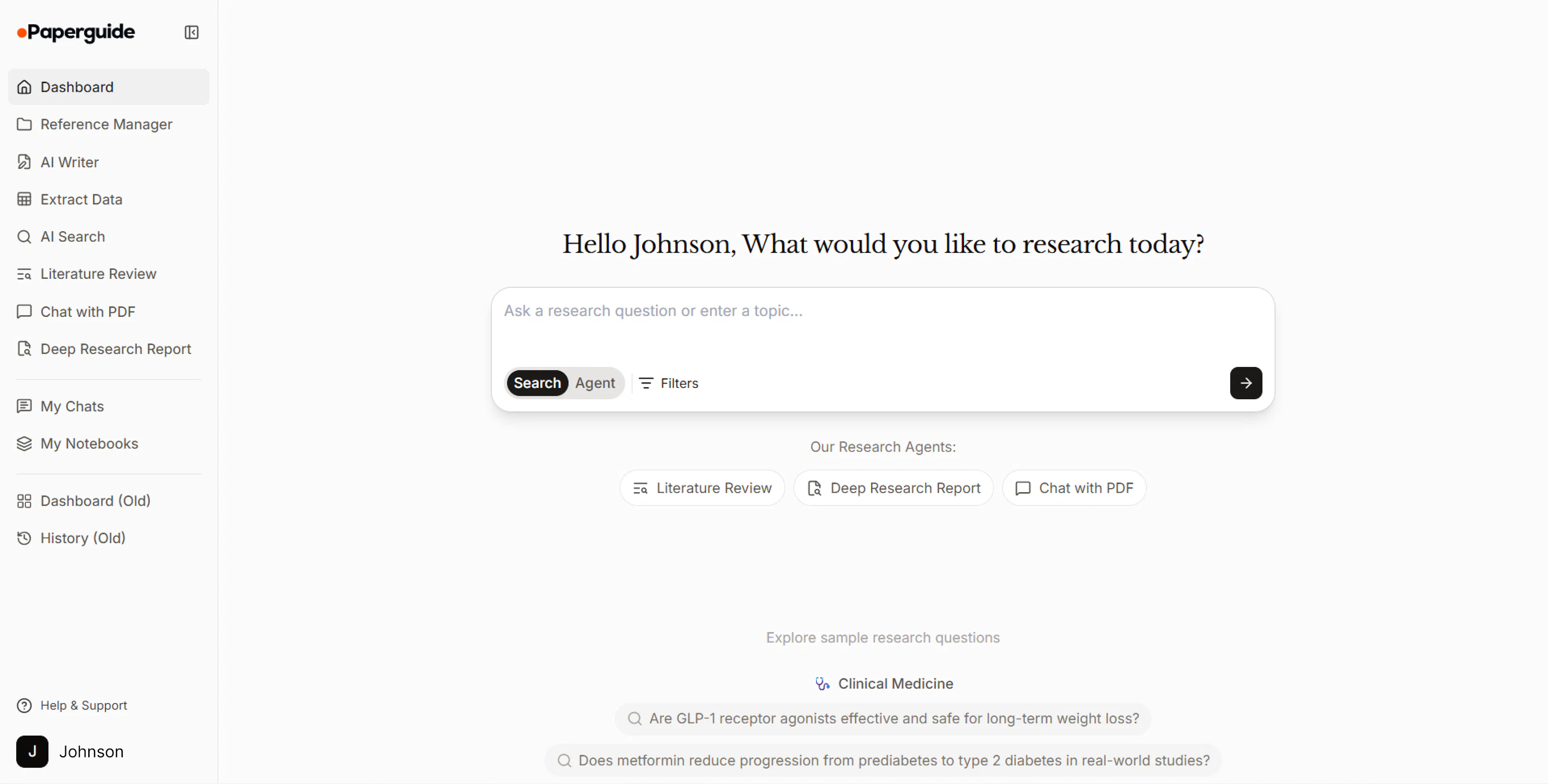
We’ve redesigned the Paperguide dashboard to center your research around AI agents and structured outputs. The new layout makes it easier to start research, manage conversations, and access generated content in one place.
What's new
A new agent-first dashboard: The dashboard now starts with Agent Search, Chat with PDF, the Literature Review agent, and Deep Research reports, so you can jump into any workflow instantly.
My Chats (new sidebar menu). All your agent conversations are now organized in one place—Search, Literature Review, Chat with PDF, and Deep Research—so you can reopen and continue work anytime.
My Notebooks (new sidebar menu). Everything you create is now easier to find: tables, documents, and any notebooks generated by agents that you save are stored here for quick access.
Extract Data in the sidebar. You can now start and access data extraction directly from the side menu, without hunting through pages.
Old dashboard still available. For accessibility, we moved the previous dashboard to the bottom of the sidebar as Dashboard (old), and your previous activity is available under History (old) inside that section.
Introducing Literature Review Agent
We’ve added a new Literature Review Agent to help you turn a research question into a traceable, structured review—without juggling dozens of tabs.
How it works
- Start from our full database (~200M papers) or use your reference manager as the input set.
- The agent creates a step-by-step plan, then helps you find relevant papers, screen them, and extract key details before drafting the review.
What you get
- A structured literature review with citations so you can verify claims quickly
- The candidate/selected papers list
- Screening outcomes (what was included/excluded and why)
- Extracted data (so you can reuse it for tables, analysis, or writing)
Use it for quick overviews or deeper dives—especially when you want the workflow and evidence in one place.
Chat with PDF
We have upgraded Chat with PDF to handle long, dense papers more reliably by using full-text context instead of relying only on small chunks.
You can now run deeper research workflows on a single PDF, including:
- Structured summaries of long sections or the full paper
- Extracting key claims with evidence from the text
- Comparing arguments or results across sections or related papers
Follow-up questions also behave more predictably, especially for queries like "where does it say that?" or "expand on this section" — the assistant will quote and expand based on the exact passages it found.
AI Search
We have launched AI Search, a new search experience powered by an agent-driven workflow that helps you go from question → evidence → answer.
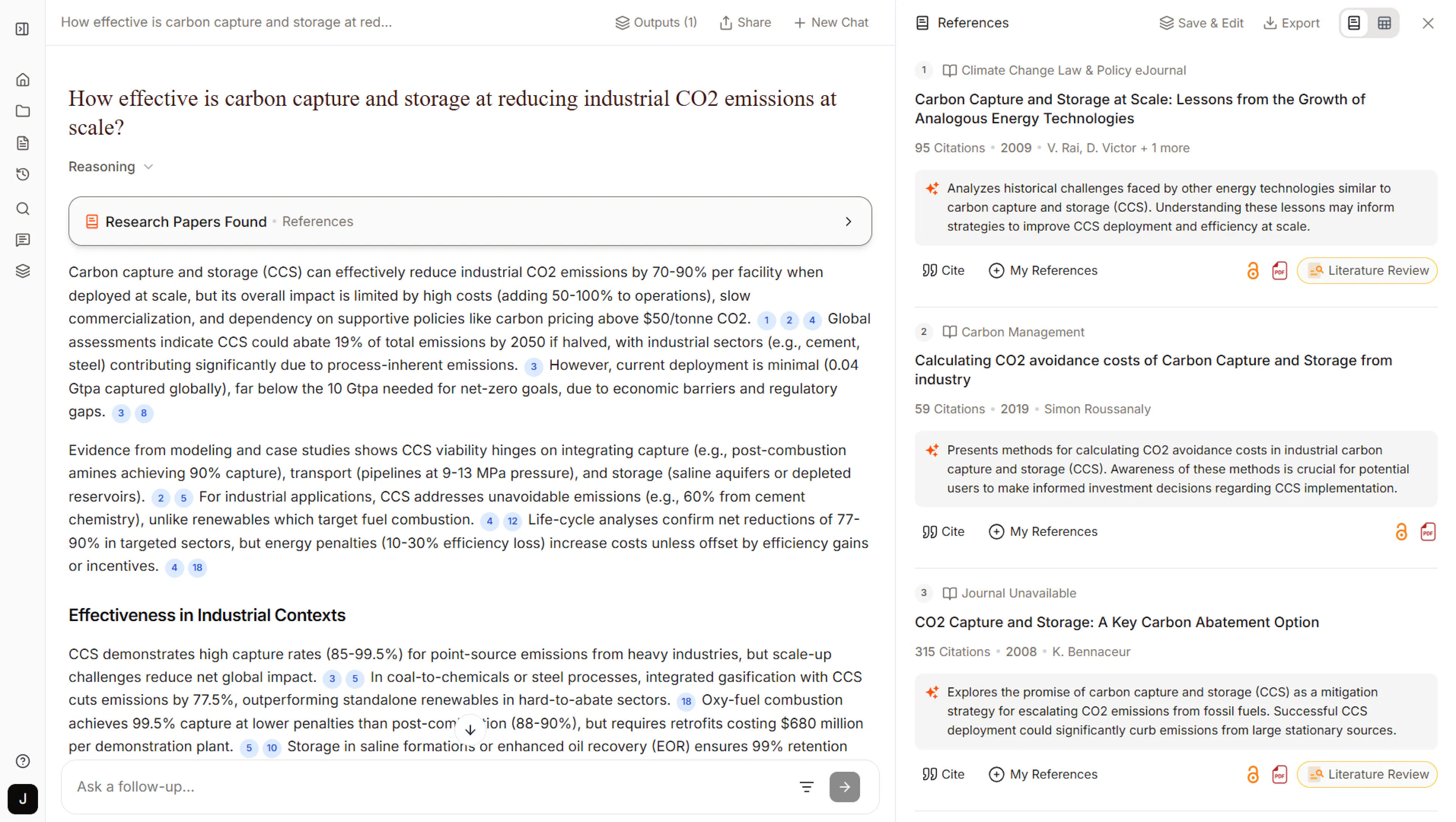
Instead of a long list of results, AI Search returns:
- Top 20 research papers most relevant to your query
- A synthesized answer built from those papers
- A reference list so you can quickly inspect the underlying evidence
It supports flexible queries as a topic, research question, paper title, or plain-language description. After you get your initial results, you can ask follow-up questions in chat to refine or go deeper without starting over.
Generate Document with Custom Outlines
You can now provide your own outline in the instructions field, and the AI will follow your structure while generating content.
In “Generate Full Document,” add your outline to the instructions field along with other requirements.
Deep Research with Your References
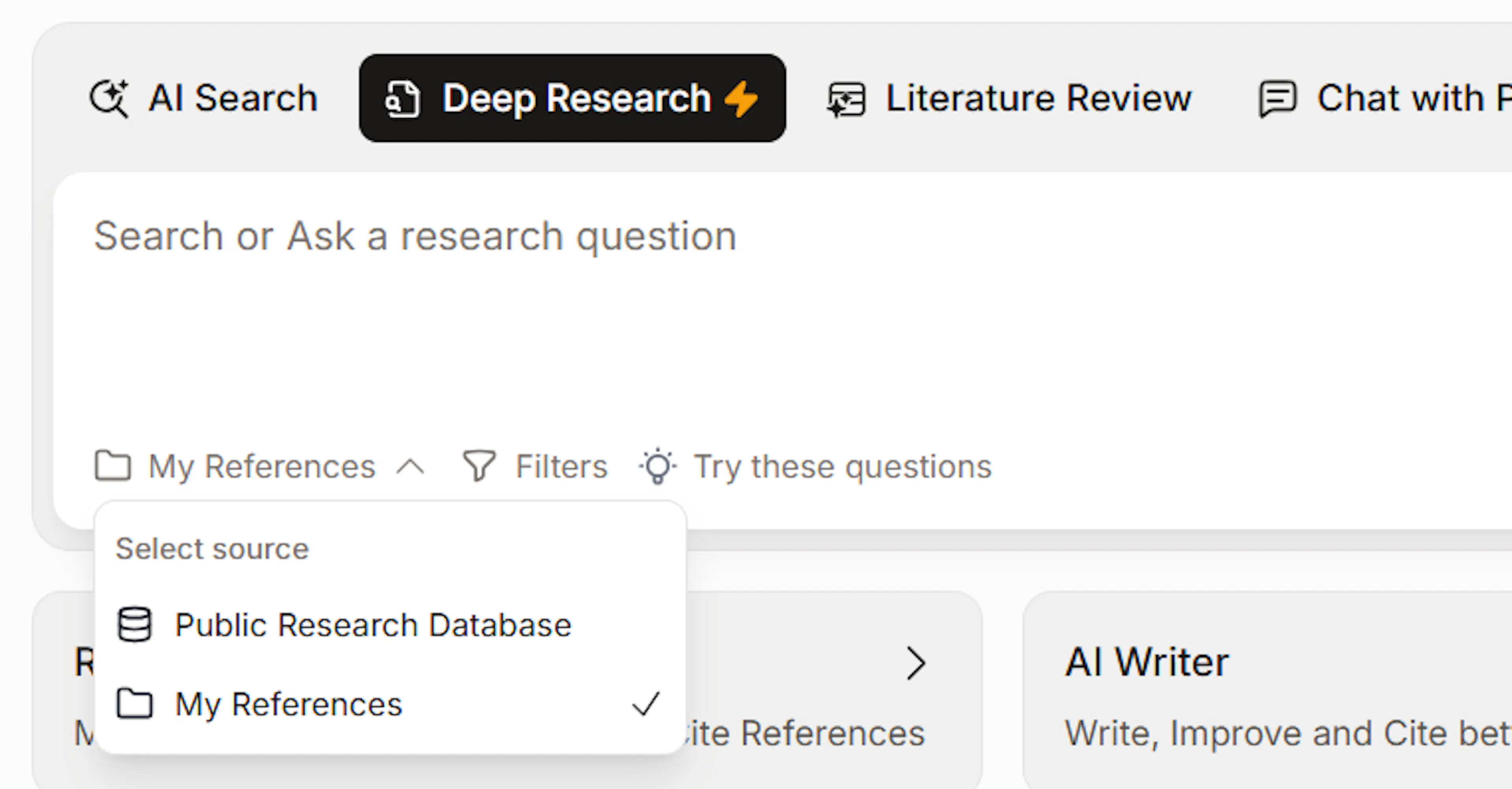
If you already have papers saved on a topic, you can now generate Deep Research Reports using only those papers.
In the Deep Research Report, select "Reference Manager" as the knowledge source and choose your folder. The agent will screen and synthesize findings from your saved papers instead of the public database.
Useful when you've already collected papers and want a comprehensive analysis without searching again
Deep Research with 50 Papers
Remember how Deep Research Report used to screen 50 papers and build your report from the top 10? That worked well for quick overviews, but many of you told us you needed to dig deeper for comprehensive reviews and grant proposals. So we've expanded the options:
- Standard Report Screen up to 80 relevant papers → Generate report from top 30 papers
Great for thorough literature reviews and academic writing - Comprehensive Report Screen up to 100 relevant papers → Generate report from top 50 papers
Ideal for systematic reviews, meta-analyses
Improved Search
We've upgraded the semantic search engine that powers AI Search and Literature Review. This means better understanding of your research questions and more relevant results.
What's improved
- Understands your questions better: AI grasps the context behind your research questions, not just keywords.
- More relevant paper matching Search results now include papers that are conceptually related to your query, not just keyword matches.
- Recognizes field-specific language The system knows when different terms mean the same thing in your research area.
For example, searching "machine learning in healthcare" now also finds papers about "artificial intelligence in medicine" or "automated diagnosis systems."
Enhanced Plagiarism Checker
We’ve enabled and upgraded our plagiarism checker with improved accuracy and better detection to help ensure your content stays original.
Paperguide ArticleGPT
Introducing Paperguide ArticleGPT—generate structured, research-backed articles in minutes. Ideal for students, researchers, and blog writers who need high-quality content with citations from over 200 million papers.
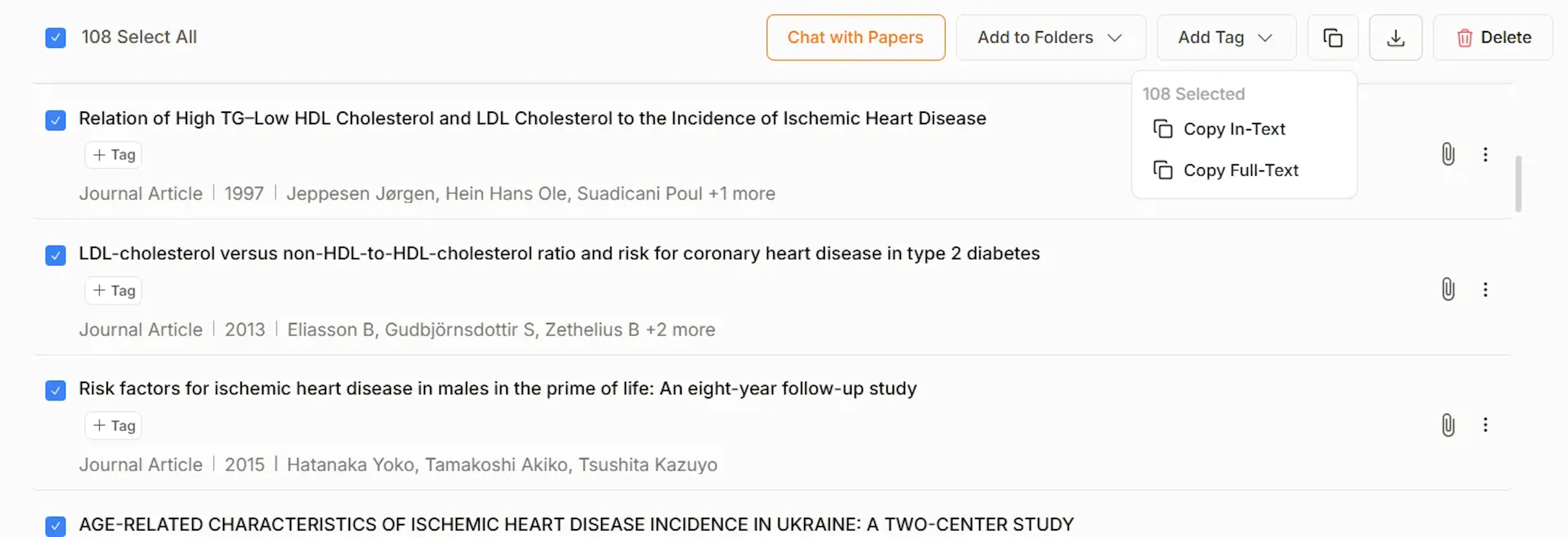
Export Multiple Citations at Once
You can now export multiple citations in one go from the Reference Manager, saving you time and effort.
Copy All Citations in Writer Document
Quickly copy all citations used in your AI Writer document with a single click—perfect for seamless referencing.
Bug Fixes & Improvements
We’ve resolved reported issues and squashed bugs for a smoother, more reliable experience across the platform.
Deep Research Report
Deep Research is our new research assistant that automatically conducts comprehensive literature reviews for you. Here's what it does:
- Create a structured research plan
- Search through millions of papers for relevant information
- Screen papers based on quality and relevance
- Extract key data points and identify patterns
- Deliver a fully cited research report
This can help you complete in minutes what might normally take weeks of manual work.